
7 Best Time Blocking Apps in 2026 (Compared Honestly)
The best time blocking app depends on how much control you want. For a free start, use Google Calendar by hand. For a simple planner with two-way Google Calendar sync, Dayrail. For a full guided daily ritual, Sunsama. For a cheap Apple-only option, Structured. To hand scheduling to an AI, Motion or Reclaim.ai.
We make Dayrail, so we've kept every claim below to what's on the public record and said plainly where a rival is the better fit.
If you're new to time blocking, start here for what it actually is. If you already know the method and just want to know which tool to use, here's the honest version: most people don't need a full AI-run calendar or a $20/month guided ritual. They need their to-do list and their calendar to finally agree. Some of the tools below are genuinely more powerful than that, and some are genuinely cheaper. This is where each one actually fits, not just a ranked top-10.
On this page
Quick comparison
| Tool | Price | Google Calendar sync | Best for |
|---|---|---|---|
| Dayrail | $7/mo or $70/yr, 3-day trial | True two-way sync | Simple, calendar-native, no ceremony |
| Sunsama | ~$17–22/mo, no free tier | Syncs, inside a full ritual | A guided AM/PM daily planning ritual |
| Structured | ~$1.49–3/mo or $29.99 one-time | iOS/Mac-focused | Apple users who want something visually clean and cheap |
| Motion | $19–29/mo per seat, 7-day trial (card required) | AI-managed | Handing your whole calendar to an AI scheduler |
| Reclaim.ai | $10–15/mo | AI-assisted | Auto-defending focus time around a full calendar |
| TimeBloc | Mobile app, low cost | Basic | Simple mobile-only time blocking |
| Google Calendar (manual) | Free | Native (it's the calendar) | Trying the method before paying for anything |
Dayrail
Dayrail
$7/month or $70/year · 3-day free trial · no permanent free tier
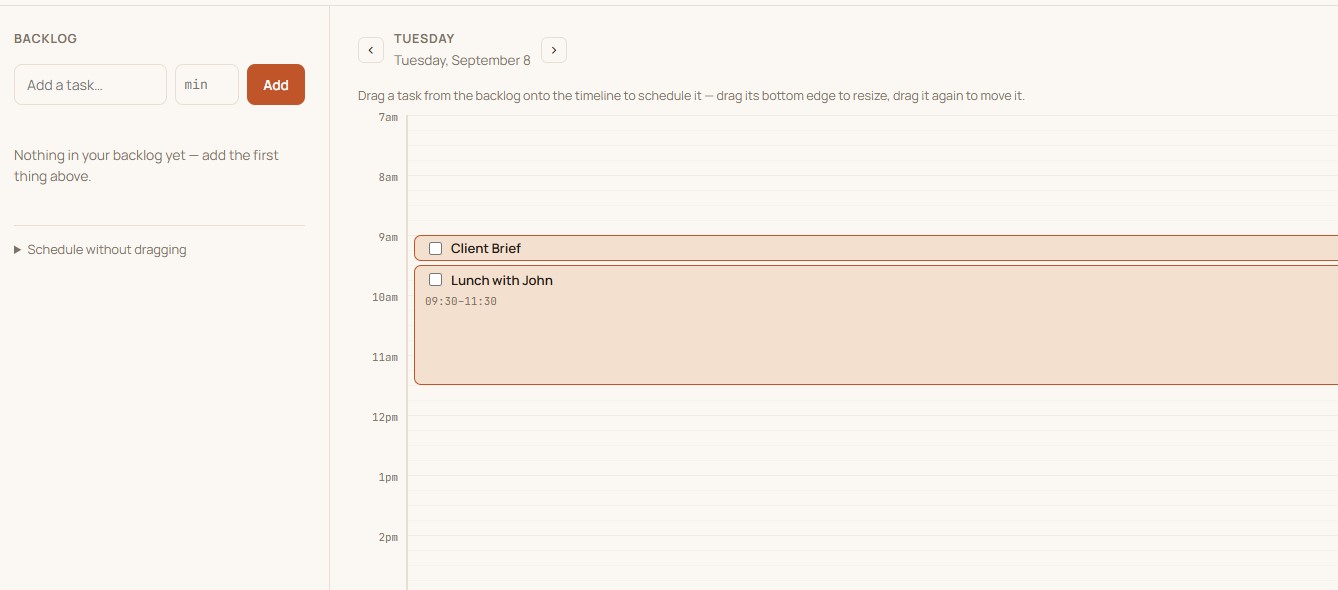
Dayrail is built around one loop: open it in the morning, drag today's backlog onto open slots on your real Google Calendar, work from a focused now/next view, and anything unfinished carries over to tomorrow automatically. It's a two-way sync. Schedule something in Dayrail and it's a real event on your actual Google Calendar, not a shadow copy living in a separate app.
- True two-way Google Calendar sync, no double entry, no separate calendar to check
- Drag-and-drop scheduling with a persistent backlog that survives across days
- Automatic carry-over, nothing gets retyped or quietly forgotten
- A short morning plan and evening review, not a full guided ritual
Best for: people who want their to-do list and their calendar to just agree, without paying for a full AI scheduler or a lengthy daily ritual to get there.
Sunsama
~$17–22/month · no free tier
Sunsama is the closest feature-equivalent to Dayrail in spirit (plan your day around real time blocks), but built as a fuller, more guided ritual: a structured morning planning flow, task pull-in from multiple integrations, and an end-of-day shutdown review with more ceremony to it. If you want that level of structure and don't mind paying roughly three times more for it, it's a genuinely well-built option. If you just want the core loop without the extra steps, that's the gap Dayrail is built to fill.
Best for: people who want a full guided AM/PM planning ritual and are willing to pay for the structure.
Structured
~$1.49–3/month or $29.99 one-time
Structured is the cheapest option here by a wide margin, and it looks genuinely good: a clean, visual, day-by-day timeline. The catch is platform lock-in: it's built primarily for iOS and Mac, and it leans more toward a standalone visual planner than a true two-way Google Calendar sync. If you're all-Apple and mainly want something that looks nice, it's hard to beat on price. If you're on Windows or Android, or you need your calendar itself (not just a planner app) to reflect what you scheduled, that's a real limitation.
Best for: Apple-only users who want something cheap and visually clean, and don't need deep calendar sync.
Motion
$19–29/month per seat · no free tier, 7-day trial (card required)
Motion goes the opposite direction from manual time blocking entirely. You add tasks with deadlines and priorities, and an AI scheduler decides when they happen and reshuffles automatically as things change. That's genuinely powerful if you want to be hands-off about scheduling, but it's also the most expensive tool on this list and the least transparent: you're trusting an algorithm's judgment about your day instead of making that call yourself with a two-second drag.
Best for: people who want an algorithm to fully run their schedule and are comfortable with the price and the black box.
Reclaim.ai
$10–15/month
Reclaim.ai sits between manual time blocking and Motion's full automation. It automatically defends "focus time" and habits around an already-busy calendar, using AI to find and protect the gaps. Priced below Motion while covering similar ground. A solid pick if your calendar is already full of external meetings and your main problem is protecting time around them, rather than planning your own work from scratch.
Best for: people whose calendars are already packed with meetings and just need focus time defended automatically.
TimeBloc
Mobile app, low cost
TimeBloc is a lighter, mobile-first take on the same core idea. Drag tasks into time blocks, build routines you can reuse, stay focused on one thing at a time. It's simple by design, which is either exactly what you want or a real limitation depending on whether you plan primarily from your phone or need something that lives properly on your actual calendar.
Best for: people who want something simple, mobile-only, and low-commitment.
Google Calendar, done manually
Free
Worth saying plainly: you don't need to pay for anything to try time blocking. Open Google Calendar, block out real durations for your actual tasks the same way you'd add a meeting, and see if the method clicks before spending money on a tool. The honest tradeoff is upkeep. Nothing carries over automatically, and rescheduling or moving unfinished work to tomorrow means doing it by hand, every day, for as long as you keep it up. Our step-by-step guide to time blocking in Google Calendar walks through the whole manual method.
Best for: trying the method itself before deciding whether a dedicated tool is worth paying for.
Which time blocking apps sync with Google Calendar?
"Syncs with Google Calendar" can mean very different things, from a real two-way connection to a loose import. Here's how the tools above compare on that one point:
| Tool | How it connects | What that means for you |
|---|---|---|
| Dayrail | True two-way sync | What you schedule is a real Google Calendar event, and edits in either place show up in the other |
| Reclaim.ai | Two-way, AI-assisted | Works around your existing calendar, automatically defending focus time and habits |
| Sunsama | Syncs, inside a full ritual | Calendar and tasks meet inside its guided daily planning flow |
| Motion | AI-managed | Manages your calendar through its own AI layer rather than mirroring it directly |
| Structured | iOS/Mac-focused | A thinner Google Calendar connection, built mainly for Apple users |
| TimeBloc | Basic | Simple, mobile-first time blocking |
| Google Calendar (manual) | Native | It is the calendar, so nothing to sync, but all the upkeep is yours |
If Google Calendar is where your day already lives, a tool with real two-way sync avoids keeping two calendars in your head. If you're not sure you need a tool at all, our honest answer to whether you need a time blocking app if you already use Google Calendar includes a five-question test.
Chrome extensions vs a full app
Searching for a time blocking tool often turns up Chrome extensions too. They're a different kind of thing, and it helps to know which you're actually looking for.
| Chrome extension | Full time blocking app | |
|---|---|---|
| What it is | A small add-on that runs on top of a web page, such as Google Calendar in your browser | A standalone product with its own account, backlog and calendar sync |
| Where it works | In the browser it's installed in | Depends on the app: web, phone, desktop |
| What it typically adds | One or two tweaks, such as extra colors, a timer or a side panel | A backlog, drag-and-drop scheduling, carry-over, a daily routine |
| Typical cost | Free or low | Usually a subscription |
| Watch out for | Permissions: extensions ask to read and change data on the sites they run on | Price, and whether the calendar sync is genuinely two-way |
If all you want is a small tweak to Google Calendar, an extension may be enough. If your real problem is upkeep (moving unfinished work forward, re-planning after a new meeting), an extension rarely fixes it, because that's a workflow rather than a feature of one web page. Features vary a lot between extensions, so read the listing and its permissions before installing. Google also now offers custom event colors natively, so a color-only extension is less necessary than it used to be.
How to choose
- Manual vs. AI-scheduled: if you want to stay in control of exactly when things happen, avoid the AI schedulers (Motion, Reclaim). If you'd rather hand that decision off, they're built for exactly that.
- Calendar-native vs. standalone: if you already live in Google Calendar for work, a tool with true two-way sync (Dayrail) avoids keeping two calendars in your head. A standalone planner (Structured) means checking two places.
- Platform: Structured is iOS/Mac-first. If you're on Windows or Android, that narrows your options.
- Price ceiling: Sunsama and Motion sit well above $15/month; Dayrail, Reclaim's paid tier, and Structured all sit under $10.
- Whether you need an app at all: Google Calendar alone is enough for plenty of people. This guide helps you decide.
- How much ritual you actually want: Sunsama's full guided AM/PM flow is a feature for some people and friction for others. Be honest about which one you are before paying for it.
Doing this natively inside Google Calendar
Google itself added a basic version of task time-blocking directly into Calendar in late 2025 (we cover the details in our Google Calendar time blocking guide). Select an empty slot, assign it to a task, and it shows up as a block. It's a real, free option if your needs are simple. Where it stops short of a dedicated tool: no backlog that persists across days, no automatic carry-over of what didn't get done, and no morning/evening structure. You're still doing all of that reconciliation yourself, just with slightly less manual drag-and-drop than a bare calendar event.
If that gap (the planning ritual, the carry-over, the backlog) is what you keep rebuilding by hand, that's exactly what Dayrail adds on top of your real Google Calendar, not instead of it.
FAQ
Which time blocking app works best with Google Calendar?
Dayrail and Reclaim.ai both offer true two-way Google Calendar sync. Structured leans iOS/Mac-focused with a thinner Google Calendar connection, and Motion manages your calendar through its own AI layer rather than syncing it directly. If Google Calendar is where you already live, a calendar-native tool avoids keeping two calendars in your head.
How much should a time blocking app cost?
Most land between $7 and $22 a month, depending on how much automation and ritual you're paying for. Bare-bones visual planners like Structured undercut that range but trade away real two-way calendar sync. AI schedulers like Motion sit above it. $7 to $15 a month is the realistic range for a calendar-native tool with genuine sync and no AI black box.
What's the difference between a time blocking app and an AI scheduling app?
A time blocking app like Dayrail, Sunsama, Structured, or TimeBloc has you drag tasks onto your calendar yourself. An AI scheduling app like Motion or Reclaim.ai decides when things happen and reshuffles automatically. The tradeoff is control versus hands-off convenience, and usually price too.
Do I need to pay for an app to try time blocking?
No. You can time block for free right now in Google Calendar by blocking out real durations for tasks the same way you'd add a meeting. It takes more manual upkeep than a dedicated tool, but it's a legitimate way to test whether the method works for you first.
What is the best free website for time blocking?
Google Calendar itself, used manually, is the most genuinely free option. No signup, no trial limit, works today. The tradeoff is you're doing all the planning and rescheduling by hand, with nothing carrying over automatically.
Are Chrome extensions good for time blocking?
They can help with small tweaks, such as extra colors or a side panel on Google Calendar, but they don't add a backlog, carry-over or a daily routine, which is where most of the upkeep is. They also work only in the browser they're installed in, and they ask for permission to read and change data on the sites they run on, so check the listing first.
Do I need a time blocking app if I already use Google Calendar?
Not necessarily. Google Calendar handles blocks, colors, Busy status and task blocks for free. An app earns its place when the upkeep becomes the problem: unscheduled tasks with no home, unfinished blocks to move by hand, and re-planning after every new meeting. See our five-question test.
Related guides
New to the method itself? Read what time blocking actually is before picking a tool.